- (877) 307-0052
- info@whyreboot.com


Steps
1. If you haven’t already done so, please download and install the FortiClient app from the previous screen. Then right-click the FortiClient VPN icon in the Windows notification taskbar area, then click Open FortiClient Console.

2. Click the hamburger menu icon, then select Add a New Connection.

3. Choose IPsec VPN and fill out the connection fields:
- Connection Name (Required) – Can be any name, but it’s best to choose something meaningful.
- Description (Optional) – Can be any name; again, use something meaningful.
- Remote Gateway (Required) – Enter the site’s DynDNS address eg. sitename.whyreboot.com
- Authentication Method (Required) – Set this to Pre-shared Key
- Pre-shared Key (Required) – Enter the exact key provided (or found on ITGlue in the Remote Access section). It is case-sensitive and must match exactly.
Finally just click "Save."

4. Review settings and make sure Mode and DH Groups match (Found in ITGlue under Remote Access)
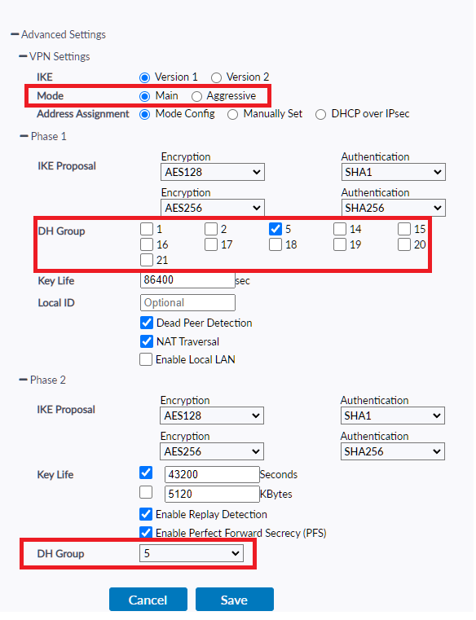
4. Select your newly created VPN connection:
- Enter your VPN username
- Enter your VPN password
- Click Connect.

5. Test the VPN connection:

Just click "Disconnect" whenever you're done!

Stay Informed!
Subscribe to our Newsletter!
© 2022 WhyReboot | All Rights Reserved